
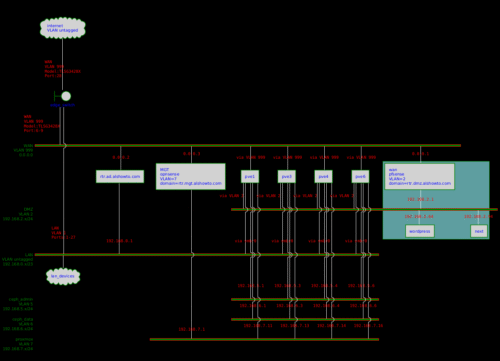
This would be a good starting place to talk about my home-lab setup. So this is no ordinary home-lab. Then again, what is ordinary about any home lab. I have attempted to start on this many times in the past but never really got very far because some of this stuff is best visualized and I did not want to had draw it in here. I just re-found PlantUML plugin and figured this would be a good place to start.
![PlantUML Syntax:</p><style>nwdiagDiagram{BackgroundColor black
network{BackGroundColor green
LineColor red
LineThickness 1.0
FontSize 10
FontColor green}server{BackGroundColor lightgray
LineColor green
LineThickness 1.5
' FontXXX only for description or label
FontSize 10
FontColor #blue}arrow{' FontXXX only for address
FontSize 10
FontColor #red
FontName Monospaced
LineColor white}group{BackGroundColor cadetblue
LineColor green
LineThickness 2.0
FontSize 8
Margin 5
Padding 5}}</style><p>nwdiag {<br/>
internet [ shape = cloud] [description=”internet\nVLAN untagged”];<br/>
edge_switch[shape = boundary] [address=”WAN\nVLAN 999\nModel:TLSG3428X\nPort:28\n”];<br/>
internet — edge_switch<br/>
group DMZ {<br/>
rtr.dmz.alshowto.com<br/>
wordpress<br/>
next<br/>
}<br/>
network WAN {<br/>
description = “WAN\nVLAN 999”<br/>
edge_switch [address=”WAN\nVLAN 999\nModel:TLSG3428X\nPort:6-9\n”]<br/>
address = “0.0.0.0”<br/>
rtr.dmz.alshowto.com [address = “0.0.0.1” description = “wan\npfsense\nVLAN=2\ndomain=rtr.dmz.alshowto.com”]<br/>
rtr.ad.alshowto.com [address = “0.0.0.2”]<br/>
rtr.mgt.alshowto.com [address = “0.0.0.3” description = “MGT\nopnsense\nVLAN=7\ndomain=rtr.mgt.alshowto.com”]<br/>
pve1 [address = “via VLAN 999”]<br/>
pve3 [address = “via VLAN 999”]<br/>
pve4 [address = “via VLAN 999”]<br/>
pve6 [address = “via VLAN 999”]<br/>
}<br/>
network DMZ {<br/>
description = “DMZ\nVLAN 2”<br/>
address = “192.168.2.x/24”<br/>
rtr.dmz.alshowto.com [address = “192.168.2.1”]<br/>
pve1 [address = “via VLAN 2”]<br/>
pve3 [address = “via VLAN 2”]<br/>
pve4 [address = “via VLAN 2”]<br/>
pve6 [address = “via VLAN 2”]<br/>
wordpress [address = “192.168.2.64”]<br/>
next [address = “192.168.2.94”]<br/>
}<br/>
network LAN {<br/>
description = “LAN\nVLAN untagged”<br/>
address = “192.168.0.x/23”<br/>
rtr.ad.alshowto.com [address = “192.168.0.1”]<br/>
lan_devices [shape = cloud]<br/>
edge_switch [address=”LAN\nVLAN 1\nPorts:1-27\n”]<br/>
pve1 [address = “via vmbr0”]<br/>
pve3 [address = “via vmbr0”]<br/>
pve4 [address = “via vmbr0”]<br/>
pve6 [address = “via vmbr0”]<br/>
}<br/>
network ceph_admin{<br/>
description = “ceph_admin\nVLAN 5”<br/>
address = “192.168.5.x/24”;<br/>
pve1 [address = “192.168.5.1”]<br/>
pve3 [address = “192.168.5.3”]<br/>
pve4 [address = “192.168.5.4”]<br/>
pve6 [address = “192.168.5.6”]<br/>
}<br/>
network ceph_data{<br/>
description = “ceph_data\nVLAN 6”<br/>
address = “192.168.6.x/24”;<br/>
pve1 [address = “192.168.6.1”]<br/>
pve3 [address = “192.168.6.3”]<br/>
pve4 [address = “192.168.6.4”]<br/>
pve6 [address = “192.168.6.6”]<br/>
}<br/>
network proxmox{<br/>
description = “proxmox\nVLAN 7”<br/>
address = “192.168.7.x/24”;<br/>
rtr.mgt.alshowto.com [address = “192.168.7.1”]<br/>
pve1 [address = “192.168.7.11”]<br/>
pve3 [address = “192.168.7.13”]<br/>
pve4 [address = “192.168.7.14”]<br/>
pve6 [address = “192.168.7.16”]<br/>
}<br/>
}<br/>](http://www.plantuml.com/plantuml/img/bLHTRzem57tdLrZiOK-a9D00RPdKhLfV05LgjQ4rLMLYDrXDxCWn13hnt-SapWTfWfcYFDW-llUSS-zrvoOIUnz_wz0O4UZToP_30Fpj0F0TkkyUPnkAVZ2VSR3ovORSfrZ4ZB-dc0nrNq5v76EQdim8nTaUnwZOULeJzvtYA0AcqKztVp8g7ia71cQvFevra7-4-HRpbgG-yTP24j_N4X-JgQQ-J7U_ficMooLWrD-3Dta5uSZb91I4KP14XYliQsX-MVaRh6X2pbciM3P4XmZnX80kOkvOihM00GPpHbaKGhVYP0QDrqJaoPDgXIqMkH1XeOYUOv5LhyuuNSuXzmW5cNqFKWwXNhewT0wTcukZPagP42emboq3da6qXY46K-3wR8DUm7F5wcatnpdqr-ns0JPKGC_3gFjoBODWvE7NA2R2NJ_dKLQ9DiZtCf1oTThzVRjGzoUJYKFd367_wcdsU3yOMkEbGnyO5rVMsA5Ps89RhrTDKJXvD_-Zt0I02swWuCE0VhHciM26om9r9AS1XGa1jQPu9rH5ybcHn5IaQdzDmJ7ZRegeCFbVQNPlacXBm-Ij9fFqZVJBmZS9AVAKQBDRfnf3wj3mBS8qmXcLgULGn098wBGfgYAI746aosTLq84dTF319thp-oU7if1M-OsE-DN3gepX5fj76RO4Wg8a1MPm1cPu1iO-ZQbsJTb_DQtoG3M3rQqNsvnOXccF3SlONLZ3CsjUNZArhbXQJooj8vRMZnnH35SBNtkeWCdKjM0cmq_Mpje6SbRCMV44jJdSJnmUTCzgyl9ERh0FwIl2M-9YAUtuQJpn39Jqp6pceokpPusAgMyispPOyVwfgjK0Gnt0FW6ekkpYSFqAKK1eezVbiT9qsUhrPTRDryqYIvJP9hE43Dg4bf1XczGIOZUBHL30Tgt9gP9gjqgrpv9gwwNQUgcsNghT83NaR1UmNQDGTQPaZbfbZgeojQz-UQlrWQf0jDP8ZDORYT6Q8p6vEuVEFm00)
